---
title: "Awesome Looking Terminal With Oh-My-Zsh"
url: "https://bosnadev.com/2015/02/26/awesome-looking-terminal-with-oh-my-zsh"
author: "Mirza Pašić"
date: "2015-02-26"
topic: "Pro tips"
tags: ["zsh", "terminal", "linux", "productivity"]
summary: "My terminal setup on Ubuntu in 2015: Guake, Zsh with Oh-My-Zsh, the agnoster theme with a patched font, and plugins such as artisan completion."
---
# Awesome Looking Terminal With Oh-My-Zsh
> Outdated: Written in 2015. Versions, APIs and advice may have changed since.
A lot of people asked me after reading my article [A Brief Introduction to Laravel Envoy]( "A Brief Introduction to Laravel Envoy"), how do I get my terminal window to look so awesome. It’s not that hard as it may look like, I keep it simple. Here is what I use:
* [Guake terminal]( "Guak Terminal")
* [ZSH (Z shell)]( "Z Shell")
* [Oh-My-Zsh]( "Oh-My-Zsh")
and of course Ubuntu GNU/Linux.
As a developer, you can increase your productivity by using terminal. But, sometimes people are just too lazy to type long commands over and over again. And it gets even more boring if you repeat same stuff every single day, at the job, at home, everywhere. That’s the primary reason why so many people are so scared of the terminal. But, it does not have to be that way. Few years ago I was so excited when I “discovered” **_Oh-My-Zsh_**. And almost instantly I switched _Bash_ with _ZSH_.
Here are the main reasons why I chose _ZSH_ instead of _Bash_ :
* **incredibly powerful, context based tab completion handling**
* **pattern matching on steroids**
* **really great community-driven frameworks available**
There are two major frameworks available for _ZSH_ , [Prezto]( "Prezto - Instantly Awesome Zsh") and [Oh-My-Zsh]( "Oh-My-Zsh Github"). Personally, I prefer _**Oh-My-Zsh**_ , but Pretzo have it’s own advantages to.
Oh-My-Zsh is an open source, community-driven framework for managing your ZSH configuration. It comes bundled with a ton of helpful functions, helpers, plugins, themes, and a few things that make you shout…
## Installing ZSH and Oh-My-Zsh
Installation of _ZSH_ is pretty simple, on Debian/Ubuntu just enter:
```bash terminal
sudo apt-get install zsh
```
_**Oh-My-Zsh**_ you can install with _**curl**_ or _**wget,**_ so make sure you have them installed:
```bash terminal
curl -L https://raw.github.com/robbyrussell/oh-my-zsh/master/tools/install.sh | sh
```
or with _**wget**_ :
```bash terminal
wget https://raw.github.com/robbyrussell/oh-my-zsh/master/tools/install.sh -O - | sh
```
For more detailed installation instruction visit the official page.
## Themify Your Promt
Another great thing with _**Oh-My-Zsh**_ is that you have a ton of useful [themes]( "Oh-My-Zsh Themes") and [plugins]( "Oh-My-Zsh Plugins") you can use to customize your prompt. I use [agnoster]( "Agnoster Theme") as my default theme. To setup this theme, just download and install one of the patched fonts for Vim-Powerline. For me [_DejaVuSansMono_]() is good enough. After you have installed patched font, edit ~/.zshrc and set **_agnoster_** for theme:
```bash title="~/.zshrc"
...
ZSH_THEME="agnoster"
...
```
Now, open **_Guake Preference_** and set default interpreter to /bin/zsh :
[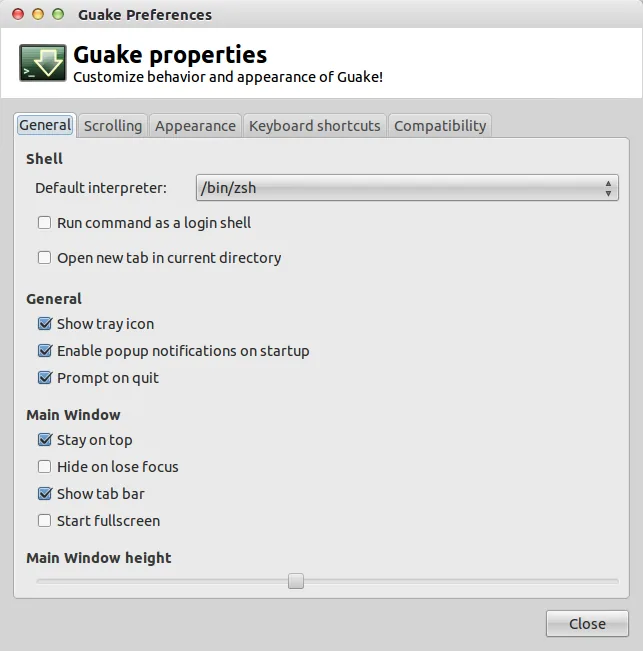](https://bosnadev.com/img/2015-02-guake-properties.webp)and in the _**Appearance**_ tab your patched font:
[](https://bosnadev.com/img/2015-02-guake-appearance.webp)
## Plugins
You can find full list of plugins [here]( "Oh-My-Zsh Plugin List"). To enable some plugin, just add it to the list in the ~/.zshrc . For example, if you are a Laravel developer as I am, you want to have Laravel4 and Laravel5 plugins enabled:
```bash title="~/.zshrc"
# Which plugins would you like to load? (plugins can be found in ~/.oh-my-zsh/plugins/*)
# Custom plugins may be added to ~/.oh-my-zsh/custom/plugins/
# Example format: plugins=(rails git textmate ruby lighthouse)
# Add wisely, as too many plugins slow down shell startup.
plugins=(git rvm rails laravel5 laravel4)
```
You’ll now have php artisan completion, which is pretty cool:
[](https://bosnadev.com/img/2015-02-artisan-autocomplete.webp)As I mentioned, you can use plugins for many other tools, for example: _bower, capistrano, docker, heroku_ and so on.
That’s it for now. I recommend you to make the switch right now. You’ll make no regret. Play around with configuration, plugins, themes. Share your configuration or tips how to make it better.